Freight forwarder AP software should help you find your margin. It checks every carrier and vendor invoice against what you expected to pay, and makes sure the charges you didn't expect reach the customer's bill. The expected cost is the accrual on the shipment in your TMS. The invoice is what the vendor actually billed. AP software lives in the gap between the two.
Most forwarders already have something touching AP. A TMS module. An OCR tool. An offshore team. A shared inbox and a spreadsheet. This guide answers a narrower question: which setup finds the margin a mismatched invoice takes with it.
Here's the short version. Your AP process probably works. Invoices get paid and the books close. It's just missing margin. BravoTran customers average 4.5 more points of shipment gross margin, measured across 54 customers.
Key takeaways
AP for a forwarder is a matching problem, not a data entry problem. Every invoice ties to a shipment, an accrual and an operator. The payoff is margin, not headcount.
BravoTran keeps your TMS and replaces the manual workarounds: shared inboxes, exception emails, template OCR, general AP platforms and offshore matching.
Matching clean invoices is a solved problem. Margin leaks in the exceptions: the detention charge nobody accrued, the accessorial with no operator attached.
Look for three things: reads any invoice format with no templates, matches every charge line to its accrual, and keeps every exception visible and owned.
Statement of account reconciliation catches what invoice matching misses. Missing invoices, duplicates and credits you never applied.
What freight forwarder AP software does
Freight forwarding accounts payable runs on accruals. When an operator books a move, the TMS records what each vendor should charge: the ocean carrier, the trucker, the customs broker, the warehouse. Weeks later, the invoices arrive. AP's job is to prove each one is right before money goes out.
AP software for a forwarder handles five jobs:
Intake. Invoices arrive by email, PDF, portal and EDI. Many land in a shared inbox with no shipment reference in the subject line.
Extraction. The system reads each invoice down to the line item. Base rate, fuel, detention, chassis, demurrage, currency.
Matching. Each line is matched to its accrual on the right shipment in the TMS.
Exceptions. Lines that don't match go to the operator who booked the move, with the invoice and the accrual side by side.
Posting. Matched invoices post back to the TMS for payment. Finance keeps working in the system it already uses.
Vendors spend most of their focus on the first two jobs. The last three decide whether the software protects your margin.
What BravoTran replaces
BravoTran doesn't replace your TMS. It replaces the manual work your team does around it. Most forwarders run some mix of these five.
A shared inbox and spreadsheets. Flexible, and everyone knows how it works. But there's no owner, no reminder and no audit trail, so small charges get skipped.
Exception emails after your TMS flags a mismatch. Clean invoices match inside the TMS. The mismatch leaves the system, and nobody tracks it to the customer bill.
Template-based OCR tools. Fast on vendors they already know. They break when a layout changes, and exceptions get worked by hand.
General AP platforms. Good at approvals, payments and ERP posting. They have no concept of shipments or accruals.
Offshore AP teams. They cover volume at a lower cost. It's the same email chase in a different time zone.
Each one covers part of the job. The exception still runs on email. That's the part BravoTran takes over.
How AP invoice automation works for forwarders
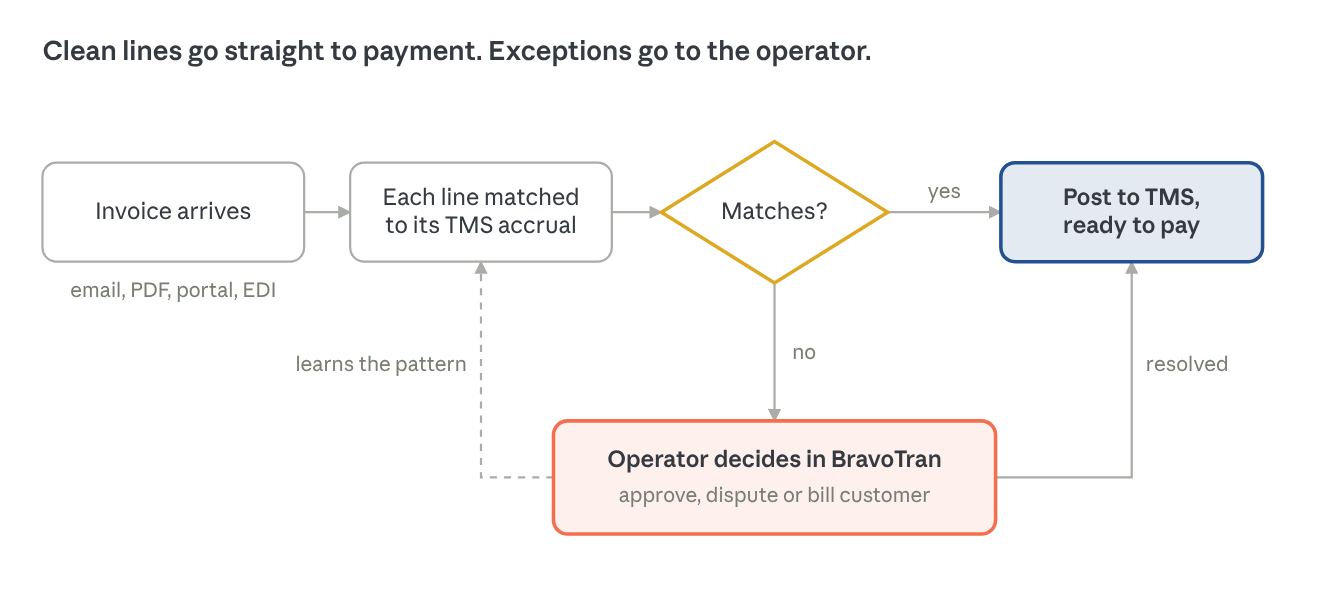
Good AP automation matches every line to its accrual and puts every exception in front of the right operator. Here is the flow inside BravoTran Payables.
Invoices land in one queue. Email, PDF, portal and EDI all feed the same place.
Every line is read and tied to a shipment. Rate, charge code, currency, amount.
Each line is matched to its accrual in the TMS. Not the invoice total. The line.
Matched invoices post back to the TMS, ready to pay. Nobody touches them.
Unmatched lines go to the operator on that shipment. BravoTran suggests the accrual: charge code, amount and the sell-side line for the customer. A valid charge takes one click to approve. The accrual is created, the invoice auto-posts, and AP never touches it again. An operator who doesn't act gets another reminder, and another, until it's handled.
The system learns from each decision. BravoTran pairs machine learning with rule-based matching it has built up over years. Each operator decision teaches it the pattern for next time.
Why the line item matters
Take an ocean invoice that matches the accrual total to the dollar. Look closer. The base rate came in lower than booked. A detention charge nobody accrued makes up the difference. Total-level matching passes it. Your customer never gets billed for the detention. Line-item matching catches it the day the invoice arrives, while the operator still remembers the load.
Every line either matches and posts, or reaches an operator inside BravoTran. Each operator decision teaches the matching for next time.
Where your margin goes: the hard 20%
Free and OCR-based tools automate the easy 80%. Your margin leaks in the other 20%. Clean invoices that match the accrual were never the problem. Exceptions are.
Two lines match. The trucking line comes in $75 over. AP emails the operator. The email has no reminder and no audit trail. By day 35 the job is closed, the invoice is paid, and the $75 never reaches the customer's bill.
That one charge takes margin on the job from 18.5% to 17.0%. It's 8% of the profit on that shipment. Now multiply it by every shipment, every month.
That happens thousands of times a year.
Most forwarders never see it happen. Your TMS won't flag a shipment as less profitable than it should have been. You might know you trail a best-in-class peer on margin. You might see month-end charges that never got tied to a job. Nobody gets a report showing which shipment, which charge and which operator.
Nobody is paid to chase $75
The AP team: "We process the invoice and pay the vendor. We go after the big variances first."
The operator: "It's $75. It's buried in my inbox."
Both answers make sense. The cost shows up later, at month-end close, as charges nobody can tie back to a job. By then, the margin is lost. The case for AP automation is finding that margin, not cutting headcount.
The industry numbers back it up. According to Accenture research, more than $10B in ocean freight and associated fees was overcharged industry-wide from 2021 to 2024. On average, only 3.3% of that was ever recovered. Accenture also ranks billing, settlement and costing as the fastest, lowest-risk automation win in forwarding, with ROI in under six months.
Where other systems fall short
Template-based capture works only when a vendor puts information in the same place. Layouts change by vendor, by entity and by what's being billed. BravoTran reads any format, with no templates.
Header-only matching compares the invoice total to the job and misses charge-line overages. That's exactly where margin leaks. BravoTran matches every charge line to its accrual.
Old-school exceptions process the consistent 80 to 90% of invoices, then hand exceptions back to your current process. BravoTran gives every exception an owner and keeps it visible.
Miss any one of the three and exceptions run by hand, outside the system. That's where the margin goes.
BravoTran Payables does all three, and backs it with a 100% automation guarantee. Every invoice is matched automatically or routed to an operator inside BravoTran. None fall back to an inbox.
Exceptions still happen. They just stop disappearing.
How the reading layer works, and why it matters
The technology that reads your invoices decides how many reach matching clean. There are three approaches on the market. BravoTran sits in the middle on purpose.
Basic OCR learns one layout per vendor and reads fields from fixed spots. It breaks when a vendor moves a field, adds a page or bills from a new entity. Handwriting trips it up too.
OCR plus machine learning (BravoTran) pulls the text with OCR. A machine learning layer trained on thousands of forwarder invoices scores what each field means, and rule-based matching built over years checks it. It still reads a new layout or a missing shipment reference and makes a scored call.
LLM-only processing has a large language model read every invoice from scratch. It costs more to run, and results can shift from one day to the next when the model updates.
The goal is predictable accuracy on invoices you've never seen before. Too rigid and every new layout becomes an exception. Too loose and you can't trust yesterday's result today.
Built for every forwarder invoice scenario
Forwarder invoices are messy before they ever reach matching. Coverage means handling all of it, not just the clean PDF.
How invoices arrive: several invoices in one email, invoices mixed with supporting docs, any file type (PDF, Excel, Word, images, ZIP), URL links to invoices, and invoices that aren't machine-readable.
Invoice complexity: statement, duplicate and revised invoices, any forwarding job type, any language.
Accounting complexity: multi-currency invoices and conversions, every tax scenario including direct and withheld, tax dates and exchange rates, multiple operating entities, consolidation accruals and apportionment.
Accruals and workflow: missing, incomplete and remainder accruals, internal approval workflows, and requests back to the vendor.
This is the difference between automating most invoices and automating all of them.
Beyond the invoice: statements, receivables and cash
Invoice matching checks what arrived. Statement reconciliation checks what didn't. The other side of the ledger needs the same discipline.
Statement of account reconciliation
Vendors send statements listing every invoice they think you owe. BravoTran compares each statement to what you've received, matched and paid. It finds the invoice that never reached your inbox, the one billed twice, and the credit you were promised and never applied. Every discrepancy links straight to the invoice behind it, because the whole history already sits in one place. Statement of account reconciliation is included with BravoTran Payables.
Receivables
AR for a forwarder has its own leaks. Charges that never make it to the customer invoice. Rate errors the customer's freight auditor catches before you do. Disputes that age past 90 days. BravoTran Receivables audits each invoice before it goes out and gives your team one place to track every open item. Forwarders using it see:
0.8% of invoices carry an underbilling caught before sending
97% on-time payment rate
45-day reduction in average DSO
50% reduction in bad debt
Cash Application
BravoTran Cash Application matches every incoming payment, remittance advice, original invoice, and bank deposit. It closes confirmed matches directly in the TMS. Only exceptions reach a person. The same pattern as Payables, pointed the other way.
Ask every vendor to answer these on a live invoice, not a slide.
Matching
Do you match at the line item or the invoice total? Show me an invoice with an unaccrued accessorial.
What do you match against: the accrual in my TMS, a purchase order, or a rate table?
What does the system learn from my team's manual matches, and how fast?
Exceptions
Where does an exception go? To a person inside your system, or to an email?
How do you find the right operator on a shipment?
What happens to an exception nobody answers? Show me the reminder and the audit trail.
Coverage
Do you need a template per vendor? Show me a multi-invoice email, a ZIP file and a revised invoice.
What share of my invoices will still need a person? What do you guarantee?
Do you reconcile vendor statements of account?
Integration
Which TMS platforms do you post into? Live connection or batch export?
Does my team keep working in our TMS, or move to yours?
Proof
Show me a forwarder like us, with numbers.
How long until our first invoices match automatically?
Getting out
Do we keep our data in our own TMS, or does it live only in yours?
How much of our process do we have to rewire to use you, and how hard is it to unwind?
Can we cancel at any time?
Heavy software is hard to leave no matter what the contract says. BravoTran posts every result back to your TMS and copies every operator message to email. Your invoices, records and status stay in your systems. You can cancel at any time. We take that risk because the software performs.
A vendor that can't show questions 1 and 4 live is selling extraction. That's step two of five.
See what the $75 costs you
BravoTran customers average 4.5 more points of shipment gross margin, measured across 54 customers. Run your own numbers in the margin ROI calculator, or watch the October webinar recording (link TBD) to follow the $75 through the full workflow.
Freight forwarder AP software checks carrier and vendor invoices against the accruals in your TMS before you pay them. It reads each invoice, matches every line to the expected cost on the shipment, posts matched invoices for payment, and routes mismatches to the operator who booked the move. The goal is simple. Pay the right amount, and bill the customer for every charge you incur.
How does AP invoice automation work for freight forwarders?
+
Invoices arrive by email, PDF, portal or EDI. The system reads each one down to the line item and ties it to a shipment. Each line is matched to its accrual in the TMS. Matched invoices post back to the TMS, ready to pay. Unmatched lines go to the operator on that shipment, with the invoice and accrual side by side. The system learns from each operator's decision and matches that pattern on its own next time.
Isn't my TMS's AP module enough?
+
For clean invoices, yes. The gap is exceptions. A TMS module flags a mismatch, then a person takes over. They find the operator, send an email and wait. That work happens outside the system with no reminder and no audit trail. BravoTran works on top of your TMS and gives every exception an owner, reminders and visibility, so the charge stops disappearing.
The catch: A TMS AP module makes intake simpler, but it depends on clean supplier data. When formatting varies across regional vendors, or a job reference is missing, your team still works those exceptions by hand.
What is accrual matching in freight forwarding?
+
An accrual is the cost a forwarder expects to pay a vendor, recorded on the shipment when the move is booked. Accrual matching compares the vendor's invoice to that expected cost. Line-item accrual matching compares each charge separately: base rate, fuel, detention, chassis and so on. It catches charges that hide inside a total that looks right.
Does BravoTran replace CargoWise?
+
No. Your TMS stays the system of record. BravoTran reads the accruals, matches invoices against them, and posts results back. It works with CargoWise and other TMS platforms.
Why does AP automation matter for freight forwarder margin?
+
Unaccrued charges get paid and never billed to the customer. Each one looks small. A single $75 charge can cut a shipment's margin by around 8%. In a manual process, these charges rarely get chased, and the TMS won't flag which shipments lost margin. AP automation catches the charge when the invoice arrives and routes it to the operator to bill.
How much margin does BravoTran help forwarders find?
+
BravoTran customers average 4.5% more points of shipment gross margin, measured across 54 customers. Pricing, fuel and vendor costs move margin too, so run your own numbers in the margin ROI calculator.